
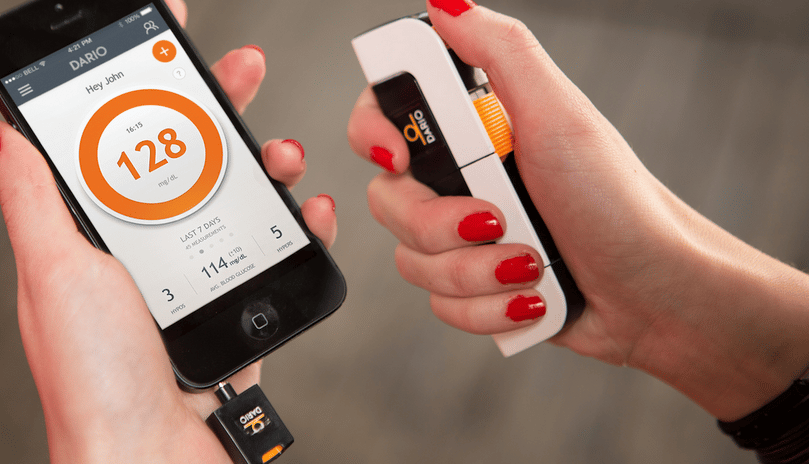
The Dario Blood Glucose Meter is a smartphone-connected finger-prick meter that pairs glucose checks with app-based tracking. It can suit people who want a compact meter and digital log in one system, but accurate readings still depend on correct setup, compatible strips, clean sampling technique, and knowing when to confirm an unexpected result.
Key Takeaways
- It is a finger-prick meter, not a continuous glucose monitor.
- Phone compatibility matters, especially with newer connectors and app updates.
- Use only compatible test strips made for the specific meter system.
- Technique affects accuracy, including handwashing and strip storage.
- Unexpected readings deserve repeat checks or clinician review when symptoms disagree.
How the Dario Blood Glucose Meter Works
A smartphone meter uses a small blood sample from a fingertip and sends the reading to a connected app. The meter hardware, test strip, lancet device, and mobile app each play a role. The app can help record results, add context, and show patterns over time, but the number still comes from a capillary blood sample.
This matters because many people compare smartphone meters with standard meters and continuous glucose monitoring devices. A smartphone meter can simplify logging, while a CGM uses a sensor to estimate glucose trends between checks. If you want a broader view of diabetes technology, the Diabetes Tech resource explains pens, pumps, and CGMs in more context.
The Dario system is often described as an all-in-one glucose meter kit because the case can hold core testing supplies. Still, you should check the exact model, phone connector, app requirements, and strip type before relying on it. If you use a newer phone, such as an iPhone 15, confirm current USB-C or adapter support through the manufacturer’s compatibility information. Phone operating systems and app versions can change.
A blood sugar monitor with finger pricks gives point-in-time information. It does not automatically show how glucose is moving between checks. That is one reason timing, symptoms, meals, activity, and medication context are important when you review your log.
Accuracy Depends on More Than the Device
Dario Blood Glucose Meter accuracy should be understood like any home glucose meter: it can be useful for daily monitoring, but it is not the same as a laboratory plasma glucose test. Home meter readings can vary within accepted device standards, and two meters may not show identical numbers from the same moment.
Several practical factors can affect a result. Food residue on fingers may raise a reading. Wet hands can dilute the sample. Expired or poorly stored strips can behave unpredictably. A very small blood drop, an interrupted sample, or testing in very hot or cold conditions may also affect performance.
Why it matters: A single unexpected number should be interpreted with symptoms and recent context.
If a reading seems wrong, wash and dry your hands, use a fresh strip, and repeat the check according to the meter instructions. If the repeated result still does not fit how you feel, contact your diabetes care team or follow the plan they gave you. Do not change prescribed insulin or other diabetes medicines based only on a questionable reading.
Seek urgent medical help if you have severe low-glucose symptoms, confusion, fainting, chest pain, trouble breathing, persistent vomiting, or signs of diabetic ketoacidosis. Very high readings with illness or ketones also need prompt clinical guidance. For background on why ketones and high glucose can be serious, see Ketosis vs Ketoacidosis.
Setup Steps That Help Prevent Bad Readings
Before you use the Dario Blood Glucose Meter, set up the phone, app, and supplies in a quiet moment. Rushing the first test increases the chance of strip errors, app permissions problems, or missed prompts.
- Confirm the exact meter model, phone connector, and operating system requirements.
- Install the current app from the official app store for your phone.
- Allow only the app permissions needed for meter connection and logging.
- Check that the test strips match the meter and are not expired.
- Wash your hands with soap, then dry them fully before testing.
- Insert the meter and strip only when the app or instructions prompt you.
- Apply the blood sample as directed, then wait for the result before removing supplies.
- Dispose of used lancets and strips safely, following local sharps guidance.
These steps sound basic, but they prevent many common errors. A meter cannot compensate for the wrong strip, a damaged strip, or a sample collected from a sticky fingertip. Good setup also makes troubleshooting easier because you can rule out simple causes first.
For people using insulin or medications that can cause low blood sugar, timing matters. Your clinician may ask for checks before meals, after meals, during illness, before driving, or when symptoms occur. Targets and testing schedules vary by person, medication plan, pregnancy status, kidney function, and risk of hypoglycemia.
Strips, Cartridge Handling, and App Data
Dario test strips are part of the meter system, not a generic accessory. Compatible test strips should match the exact Dario model and current instructions. Avoid swapping in unsupported strips, even if they look similar. Strip chemistry is meter-specific, and unsupported strips can produce unreliable results or errors.
Store strips in their intended container or cartridge, away from moisture and extreme temperatures. Close the cartridge or strip container as instructed. Do not use strips that are expired, bent, stained, or exposed to liquids. If the app shows repeated strip errors, replace the strip and inspect the cartridge before assuming the meter has failed.
People often search for how to remove a Dario test strip cartridge because the compact design can feel unfamiliar. The safest approach is to follow the official quick-start instructions for your exact model. Do not pry the cartridge with sharp tools or force it if it feels stuck. If the cartridge will not move, check for a release point, trapped strip, or case alignment issue before trying again.
The app can make glucose logs easier to review because readings can be paired with notes about meals, activity, or symptoms. Some users also find unit settings confusing. In the United States, glucose is usually shown in mg/dL. In Canada and many other countries, mmol/L is common. This converter can help compare the two units for general understanding; it does not interpret whether a result is safe for you.
Blood Glucose Unit Converter
Convert glucose readings between mg/dL and mmol/L without changing the clinical value.
These calculations are for education only and do not replace clinical advice, diagnosis, or treatment. Always confirm medical decisions with a qualified healthcare professional.
Bring app logs or exported reports to appointments when possible. Patterns across several days usually help more than isolated numbers. If you are reviewing food effects, resources such as Fruits For Diabetes and Low-GI Fruits can help frame carbohydrate choices without labeling one food as universally best.
Troubleshooting When the Meter or App Seems Off
If the Dario Blood Glucose Meter is not working, start with the simplest causes. Confirm the phone is unlocked, the app is open, and the connector is fully seated. Remove dust or lint from the phone port with safe, manufacturer-approved methods. Restart the app or phone if the meter is not detected.
Next, check the strip process. Make sure the strip is inserted in the correct direction and that the app is ready before blood is applied. Use a fresh strip if the first one gives an error. If the sample was too small or smeared, wash and dry your hands again and repeat the test with a new lancet and strip.
Connection problems may appear after phone updates. App updates, operating system changes, and privacy settings can affect external devices. If problems begin right after an update, check the app store, manufacturer support materials, and phone compatibility notes. For newer phones, connector support may be the main issue rather than the meter itself.
Accuracy concerns need a different approach. If your result conflicts with symptoms, repeat the test using careful technique. If the number remains unexpected, compare it with another approved meter if available, or ask your care team whether a lab check or meter review is appropriate. If your instructions include control solution testing, use it only as directed by the meter documentation.
Do not keep testing repeatedly without a plan if readings remain dangerously low, very high, or paired with concerning symptoms. Repeated finger-pricks can create more confusion when the next step should be medical guidance.
How Smartphone Meters Compare With Other Options
No single device is the best smartphone blood glucose meter for everyone. The better question is which monitoring method fits your clinical needs, phone, budget, dexterity, data-sharing preferences, and treatment plan. A simple standard meter may be enough for some people. Others may benefit from app-based logs or CGM trend data.
| Option | How It Checks Glucose | What It Does Well | Limits to Consider |
|---|---|---|---|
| Smartphone-connected meter | Finger-prick blood sample with app logging | Compact setup, digital notes, easier trend review | Depends on phone compatibility, app function, and matching strips |
| Standard glucose meter | Finger-prick blood sample on a dedicated device | Simple checks without phone reliance | Manual logging may be needed for pattern review |
| Continuous glucose monitor | Sensor estimates glucose in interstitial fluid | Shows trends and alerts between checks | May still require finger-prick confirmation in some situations |
CGM and finger-prick meters are not interchangeable in every situation. CGM readings can lag behind blood glucose when levels change quickly. Finger-prick checks may be preferred for confirming symptoms, calibrating certain systems, or following a clinician’s instructions. Your care team can help decide which method fits your risk of hypoglycemia, medication plan, and daily routine.
Reviews can be useful, but they should not replace compatibility checks. A positive Dario blood glucose monitor kit review may come from someone with a different phone, different strip supply, or different testing routine. Focus on the features you can verify: supported phone model, supported connector, readable app interface, clear instructions, and reliable access to the correct strips.
Using Readings in Diabetes Care Conversations
Home glucose readings are most useful when they help you and your care team see patterns. A single number has limited meaning without timing. A fasting reading, a before-meal reading, and a reading after activity can each suggest different next questions.
When you review your log, note what happened around the reading. Relevant details may include meal size, carbohydrate amount, illness, stress, missed meals, activity, alcohol, sleep changes, or medication timing. If you use insulin or medicines that can lower glucose, ask your clinician how to respond to repeated lows or unexpected highs rather than adjusting treatment on your own.
The 2024 Standards overview can help explain why diabetes care often includes individualized targets, cardiovascular risk management, kidney monitoring, and medication review. Glucose monitoring is one part of that larger plan.
It may also help to prepare questions before appointments. Ask which readings matter most for your treatment, when to repeat a test, when to check ketones, and when to seek urgent care. If you use the app reports, ask whether your clinician wants daily logs, weekly summaries, or selected readings around meals.
For broader diabetes education, the Diabetes Articles hub collects related reading on nutrition, medications, technology, and risk reduction. Use those resources for background, then rely on your clinician for individualized targets and treatment decisions.
Authoritative Sources
- FDA overview of blood glucose monitoring devices explains device oversight and home meter context.
- American Diabetes Association guidance on checking blood sugar covers monitoring discussions with a care team.
- NIDDK information on continuous glucose monitoring helps compare CGM with finger-prick monitoring.
A smartphone glucose meter can make tracking easier, but the fundamentals still matter: use the right strips, follow the setup steps, keep hands clean and dry, and confirm readings that do not match symptoms. Treat the app as a record-keeping tool, not a substitute for a diabetes care plan.
This content is for informational purposes only and is not a substitute for professional medical advice.